
Chmod Calculator
Work out Unix and Linux file permissions without memorising octal. Tick read, write and execute for the owner, group and others — or type a number such as 644 or a string like rwxr-x--- — and get the matching numeric mode, symbolic mode and ready-to-copy chmod command. Special bits and umask are covered too.
- Free to use
- No sign-up
- Runs in your browser
Chmod calculator
| Read (4) | Write (2) | Execute (1) | |
|---|---|---|---|
| Owner (u) | |||
| Group (g) | |||
| Others (o) |
Umask calculator
Linux Permissions Cheat Sheet Pack
Printable chmod and permissions cheat sheet, special bits reference, common modes by use case, a permissions audit worksheet and a find/chmod command reference.
- Chmod cheat sheet (PDF)
- Special bits & umask (PDF)
- Command reference (PDF)
- Audit worksheet (XLSX)
Formats: PDF, XLSX. Instant download after payment (link valid 72 hours, up to 5 downloads). AI-assisted: the templates were drafted with AI help and reviewed and laid out before publishing.
$5.00 USD, one-time 4 files · about $1.25 each
- Instant download
- 7-day refund
- Secure checkout by Stripe
7-day money-back guarantee. Full refund within 7 days of purchase, even after you download.
Free sample: Chmod Cheat Sheet (PDF, 53 KB)
Full refund within 7 days — see the refund policy and license.
Free printables
Single sheets you can print right now, no sign-up. The full pack adds every sheet in one download plus the editable files.
 Printable Permissions Audit Worksheet
How Unix permissions work
Every file and directory on Linux, macOS and other Unix-like systems has an owner, a group and three sets of permissions: for the owner (u), for members of the group (g), and for everyone else (o). Each set can allow read (r), write (w) and execute (x). For files, read means view the contents, write means change them, and execute means run the file as a program. For directories, read means list the names inside, write means create, delete and rename entries, and execute means enter the directory and access items in it.
Numeric (octal) permissions
| Number | Permissions | Symbolic |
|---|---|---|
| 0 | none | --- |
| 1 | execute | --x |
| 2 | write | -w- |
| 3 | write + execute | -wx |
| 4 | read | r-- |
| 5 | read + execute | r-x |
| 6 | read + write | rw- |
| 7 | read + write + execute | rwx |
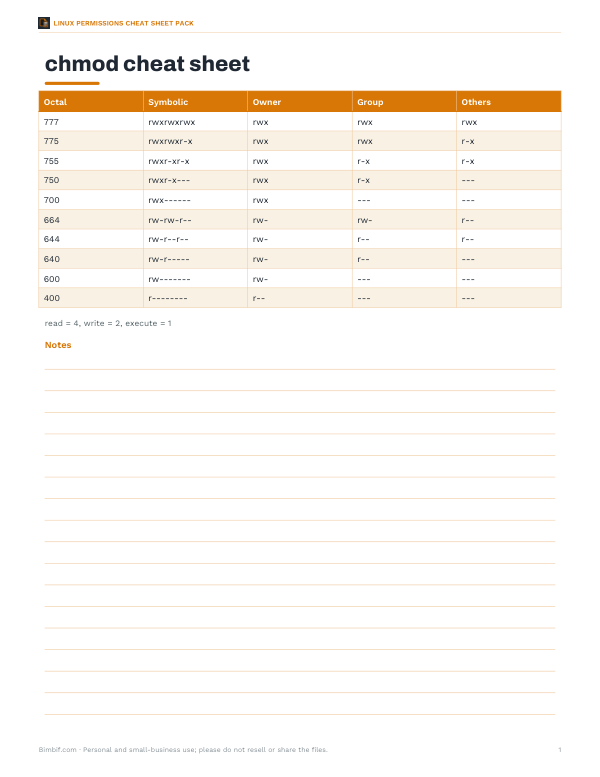
Each permission has a value — read 4, write 2, execute 1 — and the digit for each class is their sum. So 755 means owner 7 (rwx), group 5 (r-x) and others 5 (r-x). A fourth leading digit sets the special bits.
Common chmod values
| Mode | Symbolic | Typical use |
|---|---|---|
| 644 | rw-r--r-- | Regular files: web pages, documents, config readable by all |
| 600 | rw------- | Private files: SSH private keys, credentials |
| 755 | rwxr-xr-x | Scripts and programs; directories that others may enter |
| 700 | rwx------ | Private directories and scripts |
| 750 | rwxr-x--- | Shared with a group only |
| 775 | rwxrwxr-x | Group-writable project directories |
| 664 | rw-rw-r-- | Group-editable files |
| 1777 | rwxrwxrwt | Shared temporary directories such as /tmp (sticky bit) |
| 777 | rwxrwxrwx | Everyone can do everything — avoid |
Symbolic chmod commands
| Command | Effect |
|---|---|
| chmod u+x file | Add execute for the owner |
| chmod go-w file | Remove write for group and others |
| chmod a+r file | Add read for all |
| chmod u=rw,go=r file | Set exact permissions (same as 644) |
| chmod -R g+w dir | Add group write recursively |
| chmod +x script.sh | Add execute for all classes, respecting umask |
Symbolic mode is handy for changing one permission without touching the rest; numeric mode sets all of them at once.
Special permission bits
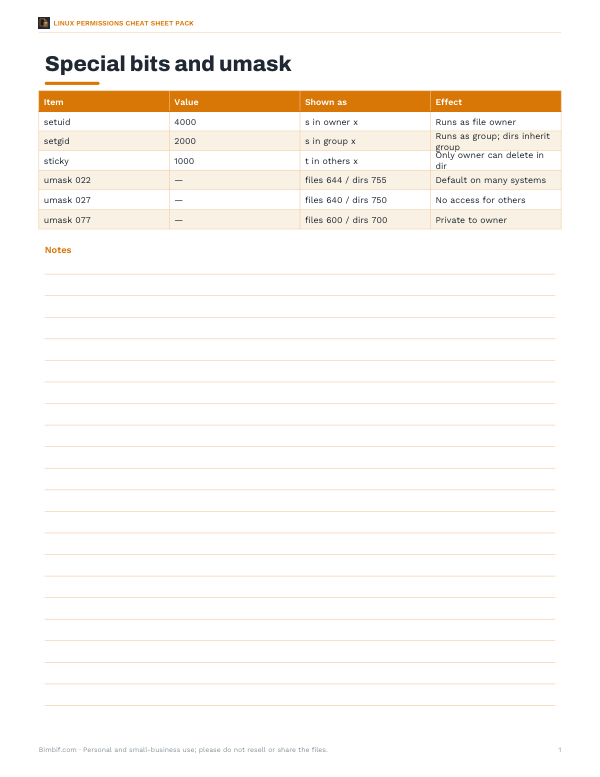
- setuid (4xxx) — when an executable runs, it runs with the file owner’s privileges.
passwduses this to update system files. Shown assin the owner execute position. - setgid (2xxx) — on executables, runs with the group’s privileges; on directories, new files inherit the directory’s group, useful for shared project folders. Shown as
sin the group execute position. - Sticky bit (1xxx) — on directories, only a file’s owner (or root) can delete or rename it, even if others have write access. Used on
/tmp. Shown astin the others execute position.
A capital S or T means the special bit is set but the underlying execute permission is not — usually a mistake.
Umask: default permissions
The umask removes permissions from the defaults used when files and directories are created. New files start from 666 and directories from 777, and the umask bits are cleared. With the common umask 022, new files get 644 and directories 755; with 077, files get 600 and directories 700 — private to the owner. Check your umask with the umask command and set it in your shell profile or service configuration.
Worked example: a web server
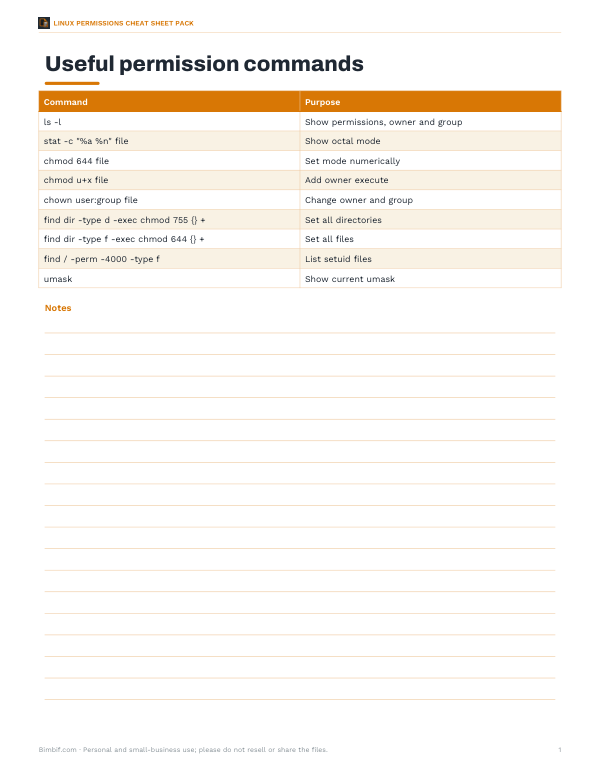
For a website served by a web server running as a different user, a common layout is directories at 755 and files at 644, owned by the deploying user. Scripts that must run are 755. Configuration files containing database passwords are 640 with the web server’s group, or 600 if only the owner needs them. Running find /var/www/site -type d -exec chmod 755 {} + and find /var/www/site -type f -exec chmod 644 {} + applies this safely, rather than a blanket chmod -R 777, which would let any process on the server modify the site.
Security tips
- Avoid 777 and world-writable files; they let any user or compromised process change them.
- Keep private keys at 600 and the .ssh directory at 700 — SSH refuses keys with loose permissions.
- Use groups to share access instead of opening permissions to everyone.
- Audit setuid programs; a vulnerable setuid binary can give attackers root.
- Remember that permissions do not apply to root, and that directory permissions control deleting files inside them.
Permissions on directories vs files
Directory permissions often surprise people. To open a file, you need execute permission on every directory in its path, even if the file itself is readable. Read permission on a directory without execute lets you list names but not open anything inside; execute without read lets you open files whose names you already know but not list the directory. Deleting a file depends on write and execute permission on the directory that contains it — not on the file’s own permissions — which is why the sticky bit exists for shared directories.
Troubleshooting “Permission denied”
- Check who you are running as:
whoamiandidshow your user and groups. - Check the file and every parent directory with
ls -ld. - Make sure the process has execute permission on each directory in the path.
- For scripts, confirm the file has execute permission and a valid shebang line such as
#!/bin/bash. - Remember that new group memberships take effect after you log out and back in.
- On some systems, extra layers such as ACLs (
getfacl), SELinux or AppArmor can deny access even when mode bits allow it.
Privacy
The calculator runs in your browser; nothing is sent anywhere.
Frequently asked questions
What does chmod 755 mean?
Owner can read, write and execute; group and others can read and execute (rwxr-xr-x).
What does chmod 644 mean?
Owner can read and write; group and others can only read (rw-r--r--).
What is the difference between 755 and 775?
775 also lets the group write.
Why is chmod 777 dangerous?
Anyone on the system can modify or replace the file.
What does the s in rwsr-xr-x mean?
The setuid bit is set: the program runs with the owner’s privileges.
What is umask 022?
It removes write for group and others, so new files are 644 and new directories 755.